Introduction:
Look in today’s digital age privacy has become a major concern. We all use WhatsApp on our phones all day long engaging in personal chats and sharing important documents.
But did you know that your account could be active on someone else’s computer or laptop without your knowledge? That’s why you should always know How To Check If Your WhatsApp Web Scanner Account Is Secretly Logged In so that no one can spy on your personal life.
In fact with a little carelessness anyone can scan our QR code and mirror all our chats on their system.
In this article we’ll take a detailed look at how you can find out where your WhatsApp is logged in and if any how to immediately remove it from an unauthorized device. Most importantly be vigilant about your privacy.
How does this matter of WhatsApp Web Linked Devices work?
Simply put WhatsApp’s Linked Devices feature is a multi-device functionality designed for user convenience. It allows you to use WhatsApp on computers or tablets other than your phone.
But there is a dark side to this. If someone gains access to your phone for even a few seconds or captures your QR code they can permanently link your account to their own machine.
This simply means that even when your phone is offline that person can read all your incoming and outgoing chats in real-time.
Many users are unaware that their account is active on an unknown browser or operating system. You can read more technical details about this. WhatsApp Security Whitepaper You can visit [http://www.security.com/encryption/device-linking/] where protocols for end-to-end encryption and device linking are explained.
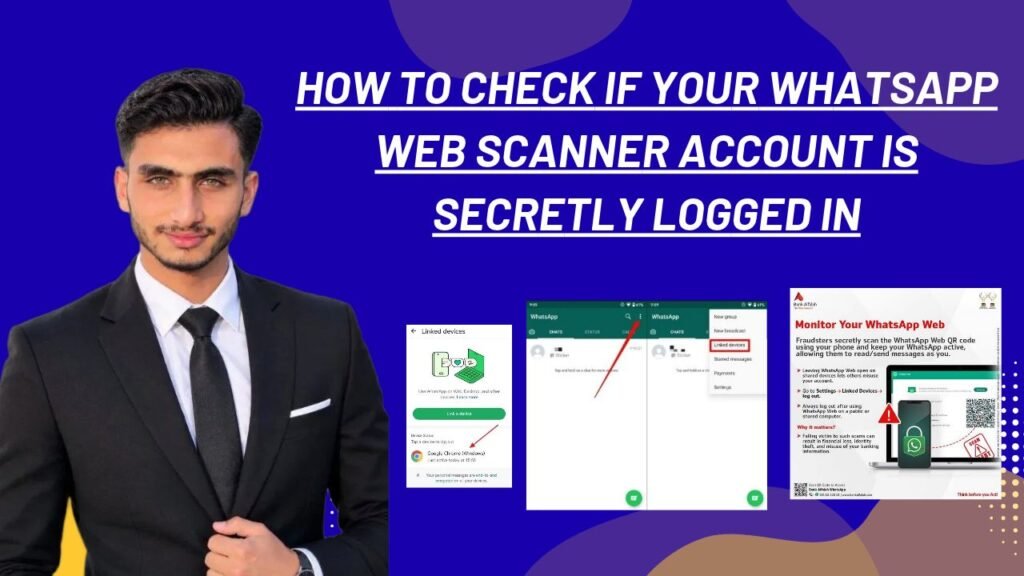
How to Check If Your WhatsApp Web Scanner Account Is Secretly Logged In
If you suspect someone is secretly accessing your chats it is ery easy to check. By following the steps below you can find out where your account is active in just a minute:
-
Open the WhatsApp app on your smartphone and go to the chat screen.
-
If you are on Android tap the three dots in the upper right corner. If you are on an iPhone tap the Settings icon at the bottom.
-
Click on the Linked Devices option from the menu . Here you will see all the sessions where your WhatsApp is currently logged in.
-
Now carefully examine the list. If you see a browser Windows PC or Mac that you don’t recognize assume it is the secret login. Tap that device and immediately press the Log Out button.
Otherwise if you wish you can also enable biometric lock to further secure your account. Official WhatsApp Support Portal You can read a more in-depth guide on linked devices management by visiting
Are Other Secure Messengers Better?
Look if you think WhatsApp’s multi-device syncing might be a bit risky and you want a messenger with even tighter device tracking and security there are some great alternatives on the market.
The first and best option is Signal Private Messenger . Signal provides a clear notification whenever a new device is linked and the list of each linked session is so transparent that no hidden connection remains hidden.
Next thing you can also use Telegram where you can directly go to Active Sessions to see which IP address which device and which location is running your account and you can remotely logout any unknown session with a single click.
Otherwise if you want to use WhatsApp only always keep your app updated. Signal Privacy Documentation But you can take a look at how modern messengers use additional security keys during device linking.
Official Linked Devices vs. Unknown Active Sessions
By looking at this table it will become clear to you what the security status of your account is and how to identify it:
Advantages and Disadvantages of WhatsApp Web Convenience vs Security Risks
In fact as easy as it is to use WhatsApp Web it also Poses Privacy risks if you are Not careful. Let’s take a Look at its Advantages and Disadvantages:
Advantages (Benefits):
-
Multi-Tasking Ease: ”You can do typing and office work quickly on your computer or laptop without picking up the phone”.
-
File Sharing: It is very Convenient to transfer large Documents PDFs and media files directly from PC.
-
Instant Sync: Messages are Synced smoothly on the web Version even when the Phone is offline.
Disadvantages:
-
Physical Access Vulnerabilities: ‘If someone takes your phone even for a few seconds they can gain permanent access by scanning the QR code’.
-
Privacy Leaks: ‘Forgetting to log out on public computers or office PCs can leak personal chats’.
-
Lack of Real-time Alerts: ‘WhatsApp Does Not Alert you in the Background about where your scanner is currently being used’.
Frequently Asked Questions
Can WhatsApp Web Be used without Scanning the QR Code on the phone?
No you just Need to scan the QR code from your phone to get started. But once linked, even if your phone is disconnected from the internet WhatsApp continues to run on the linked device until you manually log out.
If someone is secretly logged into my WhatsApp Web will they see all my old messages?
Yes when a new device is linked the recent chat history (usually chats from the last few days or weeks) from the WhatsApp server gets synced to that device so that the user can see the old conversations.
Can I log out all other unknown devices from my phone at once?
That’s right! All you need to do is go to the Linked Devices menu tap each active session you see and then select “Log Out.” This will instantly remove your account from all those computers.
Does WhatsApp Web notify when a new device is logged in?
Earlier there was no notification, but now WhatsApp shows system notification in the background that “WhatsApp Web is currently active” so that the user can get alert.
Can someone access my WhatsApp Web if they have my phone number?
No just having a phone number won’t make WhatsApp Web work. You’ll need to open WhatsApp on your physical phone and scan the QR code or you’ll need access to the phone itself.
Final Think
So the Point is that digital safety is in our own hands. If you haven’t checked the devices linked to your phone yet then after reading this article immediately go to your WhatsApp settings and check if someone else is reading your chats. How To Check If Your WhatsApp Web Scanner Account Is Let’s take a Look at its Advantages and Disadvantages: ecretly Logged In —This is information That every Smartphone user must know.
Most importantly: Be sure to share this useful guide with your friends family and anyone who uses WhatsApp Web daily so their personal data stays secure. If you have any Problems with this process please feel free to Ask in the comments section Below!