Introduction:
Look if you have an active Discord server where people upload their photos documents or media files daily you might think everything is secure. But in reality many times third-party bots and malicious webhooks are active in the background secretly scraping all your data. So if you are serious about your community and member privacy you need to understand how important it is to learn How to Prevent Discord App Bot Webhooks From Scraping Your Uploaded Server Files .
Imagine you shared some confidential project builds or personal media files on your private development server and an unauthorized bot created an index of those files via a webhook and dumped it on an external server. This could be a major security breach.
So the point is to stop blindly trusting bots on Discord and put tighter controls on their permissions. In this article we will explain in detail how these scraping mechanisms work and what are the surest ways to stop them.
How to Prevent Discord App Bot Webhooks From Scraping your Uploaded Server Files
This simply means That whenever a user uploads an image or file to Discord it Generates a CDN (Content Delivery Network) URL. If you have bots or Webhooks installed on your server that Read Message Historyhave View Channelsunchecked Permissions they can Easily harvest or scrape these URLs through Automated scripts.
Some Of The main reasons why scraping Occurs are:
-
Over-Permissioned Bots: When invite a new bot
Administratoror give it all the permissions without thinking then it can read and download Every file of the channel. -
Public Webhook Endpoints: If your webhooks are Connected to External automation tools (like Zapier or custom scripts) and the channel is public any Script can pull all the data.
-
Lack of Channel Isolation: Sharing sensitive files in general chat where every bot has access is the biggest mistake.
For more details about this technical infrastructure you can Discord Developer Portal Official Documentation You can read where the bot scopes and permissions are defined.
When you do not implement security policies on your Discord server your server data can fall into the hands of an open-source scraper or rogue bot. Most importantly members have no idea where their uploads are going.
-
Data Harvesting: Malicious developers use bots to scrape meme collections personal photos and documents from communities to use in training datasets.
-
Server Compromise: If a webhook token is leaked a hacker can use that webhook to inject spam or malicious files onto the server.
-
Privacy Violations: Like us GsTrendy Tech Guides Or talk about data privacy in freelance projects similarly user trust is paramount on community servers too which can be broken by a single leak.
Execution to Lock Down Your Discord Files
Look brother if you want that no bot or unauthorized webhook on your Discord server can scrape your uploaded files then follow these strict steps immediately:
-
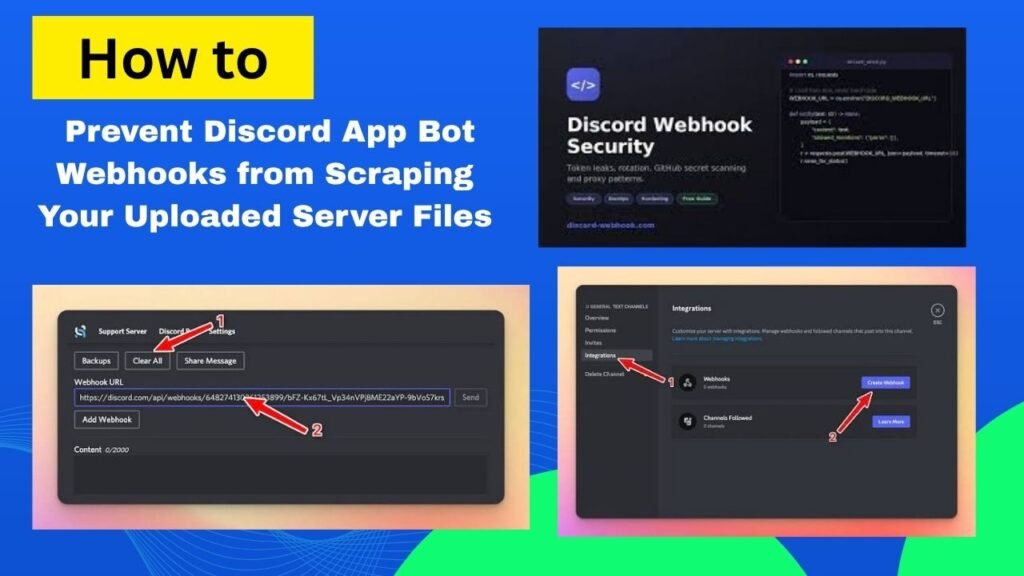
Audit and Revoke Bot Permissions: First go to the server settings and check the Roles and Integrations . Immediately restrict bots that have permissions
Administratoror unnecessary channels . Only grant permissions that are necessary for the bot to function.Read Message History -
Create a Dedicated Secure Channel: Create a separate private channel for sharing sensitive files or documents. Explicitly deny view/read access to this channel to all third-party bots and general webhooks .
-
Regenerate Webhook URLs Regularly: If you are used a webhook for an external service periodically delete the webhook and generate a new URL so that old leaked endpoints are dead. Discord Webhooks Guide You can go to see the detailed setup.
Restricted Bot Roles vs Public Webhooks
Advantages and Disadvantages of Restricting Bot File Access in Communities
Most importantly understand the benefits and challenges of tightening server permissions. Here is an honest breakdown:
-
Advantages:
-
The uploaded data of your community members remains completely secure.
-
Rogue bots and background scrapers cannot extract any media from your server.
-
Professional server management is maintained without any privacy breach.
-
-
Disadvantages:
-
Some useful automation bots take a little extra time to configure.
-
If the permissions become complex even some legitimate bots may fail to read the files.
-
Platform Options and File Storage Solutions
Otherwise if you feel that Discord is not a safe Place to share files There are some great alternative storage routes You can use:
-
Dedicated Cloud Storage (Google Drive / Mega): Instead of uploading sensitive files directly to Discord share encrypted cloud links where you control access permissions.
-
Private Media Hosting Servers: For Professional projects it is always Better to use self-hosted file servers or secure Storage buckets.
Frequently Asked Questions
Do Discord bots really scrape user uploads?
Yes if a malicious developer has created a bot that has permission to read channel history then it can download or index the CDN links of all uploaded images and files in the background through automated scripts.
What harm can happen if Webhook tokens are leaked?
If your webhook URL gets leaked to any public repository or unsafe place then any hacker can send unwanted messages spam or malicious files to your channel through that webhook which can lead to the entire server getting shut down.
Can we block specific bots on a single channel?
Absolutely! Go to the channel settings go to the Permissions tab select the role for that specific bot and set
Read Messagesit to Red Cross (X) meaning Deny. That bot will not be able to read that channel.Read Message HistoryWhat is the easiest way to prevent Discord App Bot Webhooks from scraping your uploaded server files?
The easiest and surest way is to not invite any untrusted bots to your server and minimize the permissions of all active bots and limit them to only the necessary channels.
Are files uploaded to Discord is internal servers encrypted?
Files on Discord are Transmitted via HTTPS and Stored on their servers but once a link is generated anyone with the URL can access the file. This is why maintaining Access control is crucial.
Final Think
So the point is that when running digital communities it is best to focus on convenience as well as security. Keep bot permissions on your Discord server tight and completely block unauthorized access. open your Discord server settings audit all bots and webhooks and be sure to share this important technical guide with your server moderators!
-